
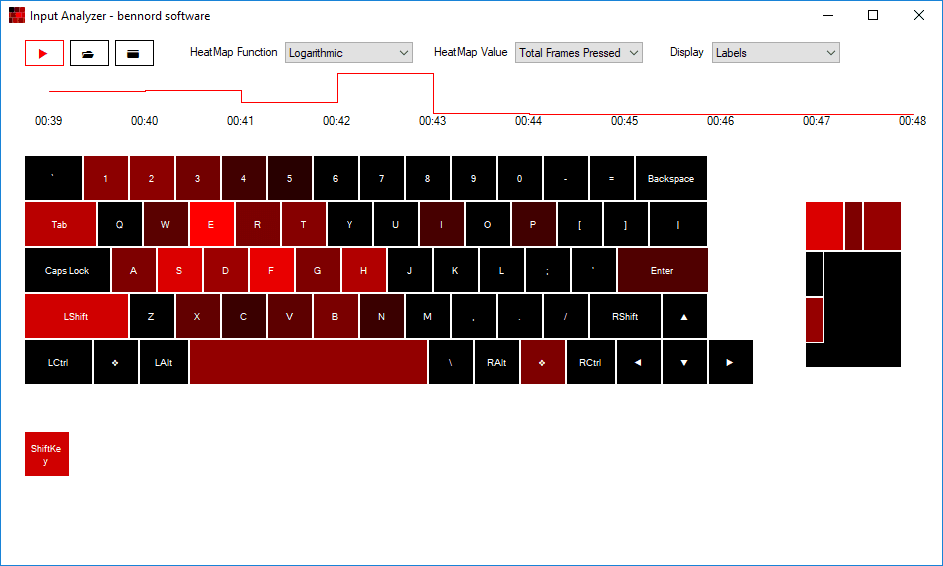
What is Input Analyzer?
Input Analyzer will build a heatmap visual representation of the input keys you use the most often during gaming or work on your PC.
- Capture input from the keyboard and mouse.
- View a colored heatmap of the input data
- Adjust coloring based on a linear or logarithmic curve.
- Save your captures for later viewing.
Installation
- Download the zip file from the link above.
- Extract the contents to a location of your choice.
- Run InputAnalyzer.exe
Note: When downloading the zip, chrome might give a warning that this file is "not commonly downloaded and could be dangerous". This is due to the fact that this site and/or project are new. As always, please scan this file or any file you are concerned about before running it.
Uninstallation
- Delete the zip contents from the folder that you extracted them to.
- (Optional) Keep a copy of the input captures that are stored in the folder named Captures. You can copy these somewhere for safe-keeping, delete them, or leave them where they are.
Changelist
2017-07-21 (1.0.0.0)
- Initial release